
Read the source range before you mark anything
The linked guide gives two related numbers: 12 inches between celery plants within a row and 24 inches between rows. Treat these as the spacing context for this crop. The 12-inch figure is the within-row interval used in the worked example below. The 24-inch figure describes row separation, so it belongs to layout decisions beyond a single row.
Spacing at sowing, thinning and initial planting is not the same as spacing established plants. A seed or seedling may be placed or thinned with the final in-row interval in mind, but the number you mark for transplants should match the stage you are planting. Decide which stage you are working on before you measure.
- Confirm you are using the detailed Planting and Spacing section, not a summary figure.
- Write down the within-row interval and the between-row interval separately.
- Decide whether you are marking sowing positions, thinning targets or transplant positions.
Source context: Utah State University Extension
Work one measured row as a labeled example
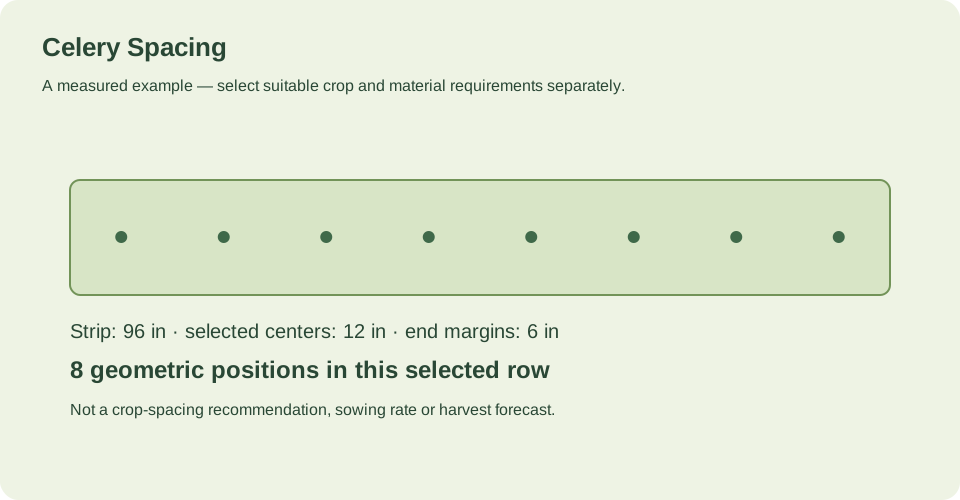
The verified example uses a 96-inch row, 12-inch centers and a 6-inch margin at both ends. With those inputs, the first center falls at 6 inches and the last at 90 inches, giving 8 counted transplants. The counted item is transplants, not seeds, seedlings or mature plants.
This is a geometrical example for one row. It does not describe an entire garden layout, and it does not add advice about bed width, path width, adjacent rows or supports. Those choices must be made separately for your site and access needs.
- Measure the actual row length in inches or centimeters.
- Choose the center interval you are applying and record it.
- Set both end margins, then mark centers from the first to the last.
- Count the marked centers and label the result as transplants.
Source context: Utah State University Extension
Separate one row from the rest of the layout
A single row count answers only how many positions fit along that measured line. It does not decide how far apart rows should be, how much access space you need, whether supports are required, or how adjacent rows interact with mature habit. The source supplies a 24-inch row separation figure, but applying it to a whole bed still requires your own layout decisions.
If you change the row length, center interval or end margins, the count changes. Keep the inputs visible so the result can be checked rather than treated as a fixed plant total.
- Record row length, center interval and both end margins together.
- Keep the single-row count separate from any whole-garden plant total.
- Choose access, supports and adjacent-row spacing as separate decisions.
Source context: Utah State University Extension
Use the row calculator for this exact count
The linked row calculator can count this exact length, center interval and both end margins, in inches or centimeters. Enter the measured row length, the selected center spacing and the margin at each end. The output is a count of positions along that row.
Check that the calculator inputs match your labeled scenario before using the number. The example's 8 transplants come from 96 inches, 12-inch centers and 6-inch margins at both ends; it is not a promise about crop performance or a full bed plan.
- Enter the row length in inches or centimeters.
- Enter the center interval and both end margins.
- Compare the calculator count with your marked positions.
Source context: Utah State University Extension
Check your measured example
One measured 96-inch row, with selected 12-inch centers and 6-inch margins at both ends. Count 8 transplants.
Reference and growing system: USU’s detailed Planting and Spacing section describes celery plants 12 inches apart within rows 24 inches apart. This example follows that named detailed section rather than a different number in a summary.
| Quantity | Calculated result |
|---|---|
| Usable row length (in) | 96 |
| Selected center spacing (in) | 12 |
| Margin at each row end (in) | 6 |
| Positions in this row | 8 |
| First center from row start (in) | 6 |
| Last center from row start (in) | 90 |
| What is being counted | transplants |
The worked example is a geometrical count for one 96-inch row with 12-inch centers and 6-inch margins at both ends. It yields 8 transplants, with the first center at 6 inches and the last at 90 inches. It does not add bed width, path width, support spacing or any other distance, and it is not a full garden layout.
Count this row in the spacing calculator ↗Example inputs explain the method. Review the source context, chosen cultivar and actual site before planting or ordering.
Your before-you-plant checklist
- Source section named and the 12-inch within-row and 24-inch between-row figures kept separate.
- Row length measured in inches or centimeters.
- Center interval and both end margins recorded.
- First and last marked centers checked against the margins.
- Count labeled as transplants for one row, not as a whole-garden total.
Questions that come up while planning
What celery spacing does the linked guide describe?
USU's detailed Planting and Spacing section describes celery plants 12 inches apart within rows 24 inches apart. This guide follows that detailed section rather than a different number in a summary.
How does the 96-inch example produce 8 transplants?
With 12-inch centers and 6-inch margins at both ends, the first center is at 6 inches and the last at 90 inches. Counting those marked centers gives 8 transplants for that one row.
Does one row count tell me my whole garden layout?
No. A row count covers positions along one measured line. Access, supports, adjacent rows and mature habit must be chosen separately, and the example does not add distances for those.
Sources & method
Horticultural guidance is linked to its original source and regional context. Geometry and unit conversions are calculated separately. Read how we prepare and check a page.
- How to Grow Celery in Your GardenUtah State University Extension