
Print or save your planning sheet
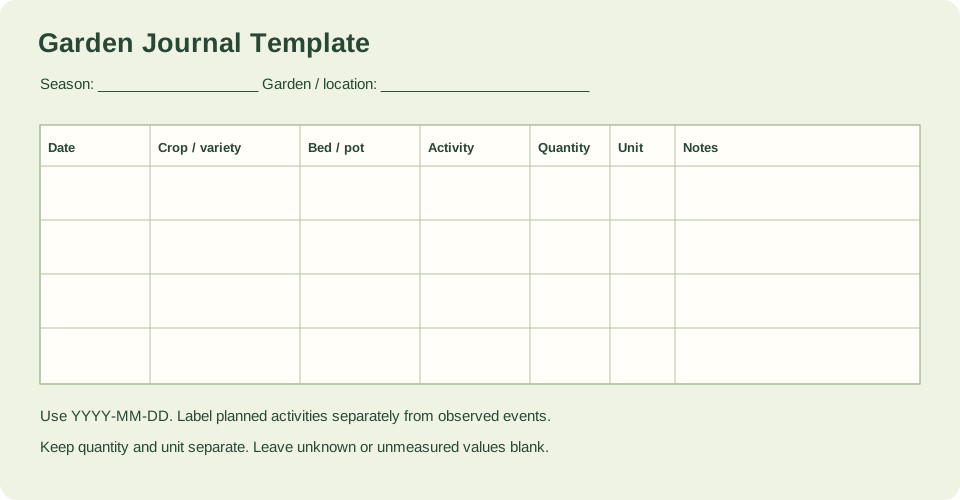
Print the page or save the blank seven-column SVG journal sheet. A CSV header is also available for your own spreadsheet.
What the seven columns hold
The columns are date, crop or variety, bed or container, activity, quantity, unit and notes. They are separate fields, not seven tasks you must complete for every entry. A single row might record one sowing, one transplant, one harvest or one observation.
Use the date format YYYY-MM-DD so entries sort correctly when you review the season. Give each bed or container a stable name, such as Bed A, and reuse it all season; a consistent label is what makes later comparison and rotation planning possible. The activity field is where you say whether the row is a plan or an observed event, for example planned sowing versus observed germination. Keeping those two kinds of rows distinct stops a plan from being read later as something that actually happened.
- Write the date as YYYY-MM-DD for every row.
- Name each bed or container once and reuse that exact label.
- Label the activity as a plan or an observed event.
Source context: University of Illinois Extension
Recording quantities and unknowns
Quantity and unit are separate columns so that unlike measurements are not merged. Record the number in quantity and the unit in unit, and keep units distinct when you review the journal; do not add counts of seedlings to weights of harvested fruit as if they were the same thing.
Unknowns stay blank. If you did not measure a harvest, note the activity and leave quantity and unit empty rather than estimating a number you did not observe. The same applies to weather or any other detail you cannot confirm: an empty field is more useful than a fabricated one, because it tells you honestly what the record does not contain.
- Put the number in quantity and the measurement in unit.
- Leave quantity and unit blank when nothing was measured.
- Keep unlike units separate when comparing entries.
Source context: University of Illinois Extension
Paper, CSV and browser export
The printable worksheet and the blank CSV share the same headers, so you can start on paper and move to a file, or begin with the CSV. The browser journal can export a filled CSV and a full JSON backup; this resource supplies the blank starting sheet. No PDF file, spreadsheet formula engine or cloud storage is supplied, so plan to keep your own copy of any file you fill in.
A useful record can include dates, weather, planting and harvest observations, and sketches showing where crops grew. Location records help later rotation planning, though a journal does not itself establish an appropriate rotation interval. Treat the journal as evidence you gather, and check rotation guidance separately before deciding what to plant where.
- Print the worksheet in the browser or download the SVG if you prefer paper.
- Download the blank CSV to start a digital record with the same headers.
- Export filled CSV or JSON from the browser journal and store your own copy.
Source context: University of Illinois Extension
Check your measured example
A blank record structure, ready for the reader’s own observations. The seven fields are separate columns, not seven required activities.
| Quantity | Calculated result |
|---|---|
| columns | 7 |
| date format | YYYY-MM-DD |
| bed label example | Bed A |
| quantity and unit | Separate fields; leave blank if not measured |
The supplied example is a blank record structure with seven separate columns, not seven required activities. It shows the date format YYYY-MM-DD, a bed label such as Bed A, and quantity and unit as separate fields that stay blank when nothing was measured. It is a starting layout for your own observations, not a claim about any crop's results.
Example inputs explain the method. Review the source context, chosen cultivar and actual site before planting or ordering.
Your recordkeeping checklist
- Every row has a date in YYYY-MM-DD format.
- Each bed or container uses one stable name all season.
- Each activity is labeled as a plan or an observed event.
- Quantity and unit are recorded separately, or left blank if not measured.
- A personal copy of any exported CSV or JSON file is saved.
Questions that come up while planning
Should I fill every column for every entry?
No. The seven fields are separate columns, not seven required activities. Record what applies to that row and leave unknown or unmeasured fields blank.
How should I tell a plan from something that happened?
Use the activity field to label each row as a plan or an observed event, such as planned sowing versus observed germination. Keeping them distinct prevents a plan from being read later as a record of what occurred.
Why keep quantity and unit in separate columns?
Separate fields let you record a number and its measurement without merging unlike quantities. When you review the season, compare entries with the same unit rather than adding counts to weights.
Sources & method
Horticultural guidance is linked to its original source and regional context. Geometry and unit conversions are calculated separately. Read how we prepare and check a page.
- Garden Journal: A helpful gardening toolUniversity of Illinois Extension